
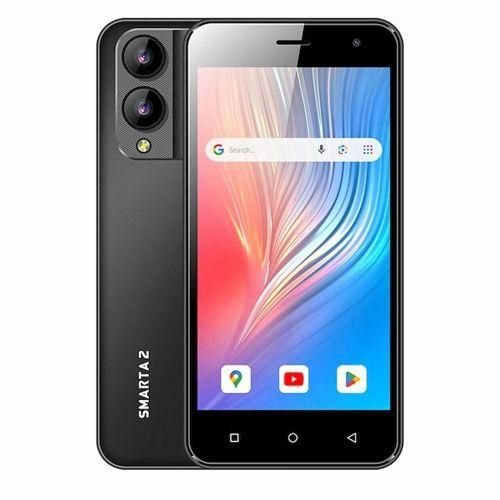

Safaricom Neon Smarta 2 in Kenya
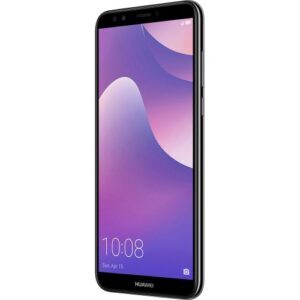
The Safaricom Neon Smarta 2 price in Kenya is KES 5,500. It is an ultra‑affordable entry‑level smartphone in Kenya by Safaricom that features a 5‑inch display, 2GB RAM, 32GB storage, and an upgraded 8MP rear camera compared to the predecessor Neon Smarta.
Key Highlights:
- Camera upgrade: The Rear camera improved from 5 MP (Smarta) to 8 MP in Smarta 2.
- Same core hardware: Still 2GB RAM + 32GB storage, ensuring smooth Android Go performance.
- Affordable pricing: The price is KES 3,500, making it one of the cheapest 4G smartphones in Kenya.
- Battery life: 3000 mAh capacity, enough for a full day of light use.
- Dual SIM flexibility: One slot locked to Safaricom, the second slot open to other carriers.
Safaricom Neon Smarta 2 Full Specifications and Price:
| Model Name | Safaricom Neon Smarta 2 |
| Launch Year | 2022 (successor to Neon Smarta) |
| Brand | Safaricom |
| Operating System | Android 10 (Go Edition) |
| Chipset / CPU | MediaTek entry‑level quad‑core |
| GPU | Basic Mali GPU (for light apps) |
| RAM | 2 GB |
| Internal Storage | 32 GB |
| Expandable Storage | microSD support (up to 64 GB, depending on variant) |
| Display Type | 5.0‑inch IPS LCD |
| Resolution | FWVGA (854 × 480 pixels), ~196 ppi |
| Rear Camera | 8 MP, LED flash |
| Front Camera | 2 MP |
| Video Recording | 720p@30fps |
| Battery Capacity | Non‑removable Li‑Po 3000 mAh |
| SIM Type | Dual SIM (SIM 1 locked to Safaricom, SIM 2 open to other networks) |
| Connectivity | 2G / 3G / 4G LTE, Wi‑Fi, Bluetooth, GPS |
| Ports | microUSB 2.0, 3.5mm headphone jack |
| Fingerprint Sensor | No |
| Dimensions | Compact 5‑inch body |
| Colors Available | Black |
| Price in Kenya | KES 5,500 |

Charanjeet Singh Sehmi –
I do have the Neon Smarta 2 phone, couple of months old. Loaded some softwares to clean the phone up and it stopped workin, switches on but no response. What have i done wrong. I removed the battery and charged it full, no change. Please let me know what to do.
Gideon Sigei –
Sorry about that Charanjeet.
Kindly check with a Safaricom Shop for service.
Stella Onyango –
I have not been able to install Whatsapp on my new phone.whenever I install,it never gives me the option to Open.what could be the problem?
Gideon Sigei –
Sorry about that, Stella.
This is typically caused by a frozen Google Play Store process, or a corrupted package installation cache
.1.Restart the Phone: Quick reset. Press and hold the power button, then tap Restart. This clears temporary system glitches preventing the installer interface from refreshing.
Verification: Check if the Play Store updates its status to show the “Open” button once the phone boots back up.
2.Clear Google Play Store Cache and Data: Settings app. Go to Settings > Apps & Notifications (or Apps) > Google Play Store. Tap Storage & cache, then select Clear Cache and Clear Storage.
Verification: Re-open the Play Store, search for WhatsApp, and check if the installation prompt corrects itself.
3.Check Available Internal Storage: System setting. Entry-level devices have limited space. Go to Settings > Storage to ensure you have at least 500MB to 1GB of free space available. If storage is nearly full, uninstall unused apps or clear old files.
Verification: Verify that the free storage meter shows ample breathing room.
4.Alternative Installation via App Info:Manual check.Go to Settings > Apps > WhatsApp. If the app is listed there, tap it and check if you can manually tap Enable or Open. If it fails, tap Uninstall, restart the phone, and download it fresh from the Play Store.
Verification: The “Open” button appears directly within the app’s settings info page or application drawer.