


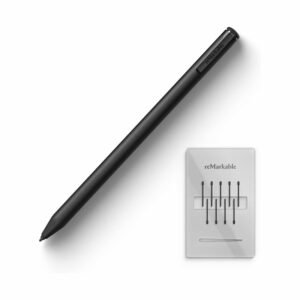
reMarkable Paper 2 + MarkerPlus Price in Kenya
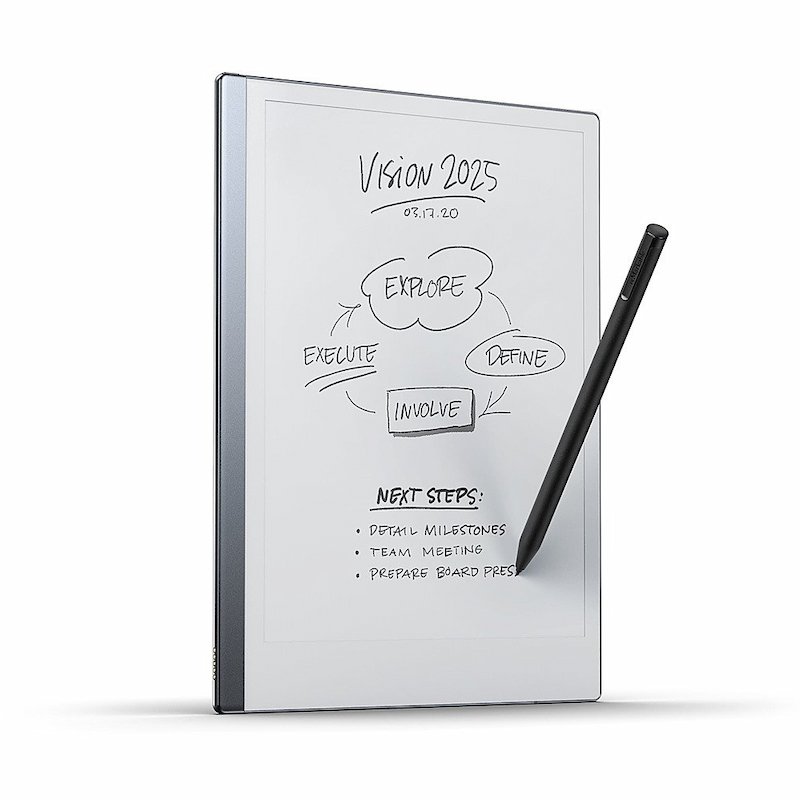
The reMarkable 2 price in Kenya is KES 74,500. It is a digital paper tablet that strives to provide a writing and reading environment free from distractions for professionals and students. It features a 10.3-inch display that allows for an anti-glare effect to simulate that of paper, thus being great for extended readings and very detailed note-taking. Its 1.2 GHz dual-core ARM processor and 1 GB RAM allow very responsive writing and sketching sessions.
Performance & Connectivity:
With 8GB internal storage, the reMarkable 2 can hold a good number of documents and notes as part of its library. Wi-Fi connectivity enables cloud syncing and easy file sharing, which is much needed by professionals who need to access their work from different devices. The device runs a variant of reMarkable OS optimized for these core functions. The reMarkable accepts documents in PDF and ePUB formats and images in PNG and JPG formats. The battery of 3000 mAh will last two weeks on a single charge, rendering it most suitable for a lot of work out there.
reMarkable Paper 2 Detailed Specifications:
| Price | KES 75,999 |
| Display | 10.3-inch monochrome E Ink Carta display with a resolution of 1872 x 1404 pixels (226 DPI). |
| Processor | 1.2 GHz dual-core ARM processor for smooth performance. |
| Storage | 8GB internal storage, capable of holding thousands of documents and notes. |
| RAM | 1GB LPDDR3. |
| Battery Life | 3000mAh battery offering up to 2 weeks of usage on a single charge. |
| Operating System | reMarkable OS, optimized for note-taking, reading, and sketching. |
| Connectivity | Wi-Fi (2.4GHz and 5GHz) for cloud syncing and file transfers. |
| File Formats | Supports PDF and ePUB for documents and PNG, JPG for images. |
| Dimensions | 246 x 187 x 4.7 mm (H x W x D). |
| Weight | Approximately 403.5 grams. |
| Build Material | Aluminum chassis with a paper-like surface for writing. |
| Ports | USB-C for charging and data transfer. |
| Stylus Compatibility | Works with the reMarkable Marker and Marker Plus (no charging or batteries required). |
| Special features |
|
reMarkable 2 with Marker Plus Frequently Asked Questions (FAQs)
1. What is the reMarkable 2 used for?
The reMarkable 2 is a digital paper tablet designed for writing, note-taking, sketching, and reading documents. It provides a distraction-free experience similar to writing on real paper.
2. What is the difference between the Marker and Marker Plus?
The Marker Plus includes a built-in eraser on the top, allowing you to erase notes naturally like a pencil. The standard Marker does not have this eraser feature.
3. Does the reMarkable 2 come with a pen included?
Yes, this package includes the Marker Plus stylus, so you can start writing immediately without needing to purchase a separate pen
4. Does the reMarkable 2 support apps like WhatsApp, YouTube, or browsing?
No, the reMarkable 2 is designed as a distraction-free device. It does not support third-party apps, social media, or web browsing.
5. Can I read PDFs and eBooks on the reMarkable 2?
Yes, it supports PDF and EPUB formats, making it ideal for reading, annotating, and reviewing documents.
6. Does it have backlight or front light for night use?
No, the reMarkable 2 does not have a backlight. It is designed to mimic real paper, so you will need external lighting in low-light environments.
7. How long does the battery last?
The battery can last up to 2 weeks on a single charge, depending on usage.
8. Can I transfer files to and from the device?
Yes, you can transfer files via Wi-Fi using the reMarkable app (available on mobile and desktop) or via USB.
9. Does it support cloud storage?
Yes, it supports cloud syncing through reMarkable’s cloud service, allowing access to your notes across devices.
10. Can I convert handwritten notes to text?
Yes, the reMarkable 2 can convert handwritten notes into typed text, which can then be shared via email or exported.
11. Is the reMarkable 2 good for students and professionals?
Yes, it is ideal for students, professionals, and creatives who want a focused environment for note-taking, document review, and brainstorming.
12. Does it support colors for writing or drawing?
The display is monochrome (black and white), so it does not support color writing or drawing.
13. Is there a subscription required to use reMarkable 2?
Basic features work without a subscription, but some cloud and advanced features may require a reMarkable Connect subscription.
14. Does reMarkable 2 come with a folio or case?
This depends on the package. Some bundles include a folio, while others come with the tablet and Marker Plus only.
15. Can reMarkable 2 use it for drawing and sketching?
Yes, the reMarkable 2 is excellent for sketching, offering pressure-sensitive input for a natural drawing experience.


Reviews
There are no reviews yet.